 Dandelion Creations
Mini Cash-Up · Daily Cash Reconciliation
Know the till balances before you lock the door.
Close each till in a few minutes. Type in the float, the takings and what you counted, and Mini Cash-Up shows straight away if the drawer is over or short. It runs from your own Google Sheet. Pay once, no subscription.
R499 once-off. No subscription. Make your own copy of the demo sheet, then start the 72 hour demo with the key CSH-DEMO-2026. A free setup call is included if you want a hand switching it on.
Best for shops, coffee shops, restaurants and salons that take cash and close a till every day. It does not do stock, invoicing or bank reconciliation.
A short till you find a week later is hard to explain.
The till slip says one thing, the drawer says another, and nobody remembers why. Mini Cash-Up checks the drawer while the day is still fresh, and asks for a reason while someone can still give one.
Owned, not rented
No monthly fee and no price per till. It runs in your own Google account and keeps working.
Your numbers stay yours
Every cash-up sits in your own spreadsheet. We never see it. The only thing we check is your activation key and the Google email that activates it, once.
Locked once it is closed
A closed day can't be quietly changed. Reopening one needs a reason, and the log keeps who did it and when.
How it works
From ordering to your first closed till in three steps.
Get your sheet and key
Order and pay, and we email you the sheet link and your activation key.
Switch it on once
A short guide takes you through setup from your own Google account. Or book a free setup call and we do it together on a screen share, up to 20 minutes.
Cash up at closing
Bookmark one private link on the till computer or a phone. Add your tills and the names of the people who cash up, and you are ready.
What is inside
The four things a cash-up has to get right, and the reports that come out of them.
- Daily till reconciliationOpening float, takings by cash, card, EFT and other, and the counted cash. Expected cash and the difference update as you type.
- Count by notes and coinsR200 x 2 = R400, all the way down to 10c, with the total at the bottom. The total becomes the counted cash, and it prints on the end-of-day report.
- Card machine slipsType each machine's end-of-day total, like Yoco or Speedpoint. If the slips don't match the card sales on the till, you'll see it straight away.
- Payouts and petty cashMilk, a delivery tip, stamps. Each one is listed against the day, so the drawer still adds up.
- Float trackingTomorrow's float comes from what was left in the drawer today. If someone opens with a different amount, the dashboard says so.
- Discrepancy alertsYou pick the amount. A drawer or a card slip total out by more than that is flagged, and the day can't close without a reason.
- End-of-day reportsEvery till for the day on one page, ready to print or save as a PDF for the file.
- More than one tillEach till is cashed up on its own. With one till, you never see a till picker.
- Named cashiersPick who is closing from a list, so you can see whose shift a shortfall was on.
- Month viewEvery day of the month at a glance, coloured balanced, over, short or not closed, plus your financial year so far.
- VAT if you need itSwitch it on and see how much of the takings is VAT. Each day keeps the rate it was closed with.
- CSV for your bookkeeperDownload the days and the payouts for any month.
See it in action
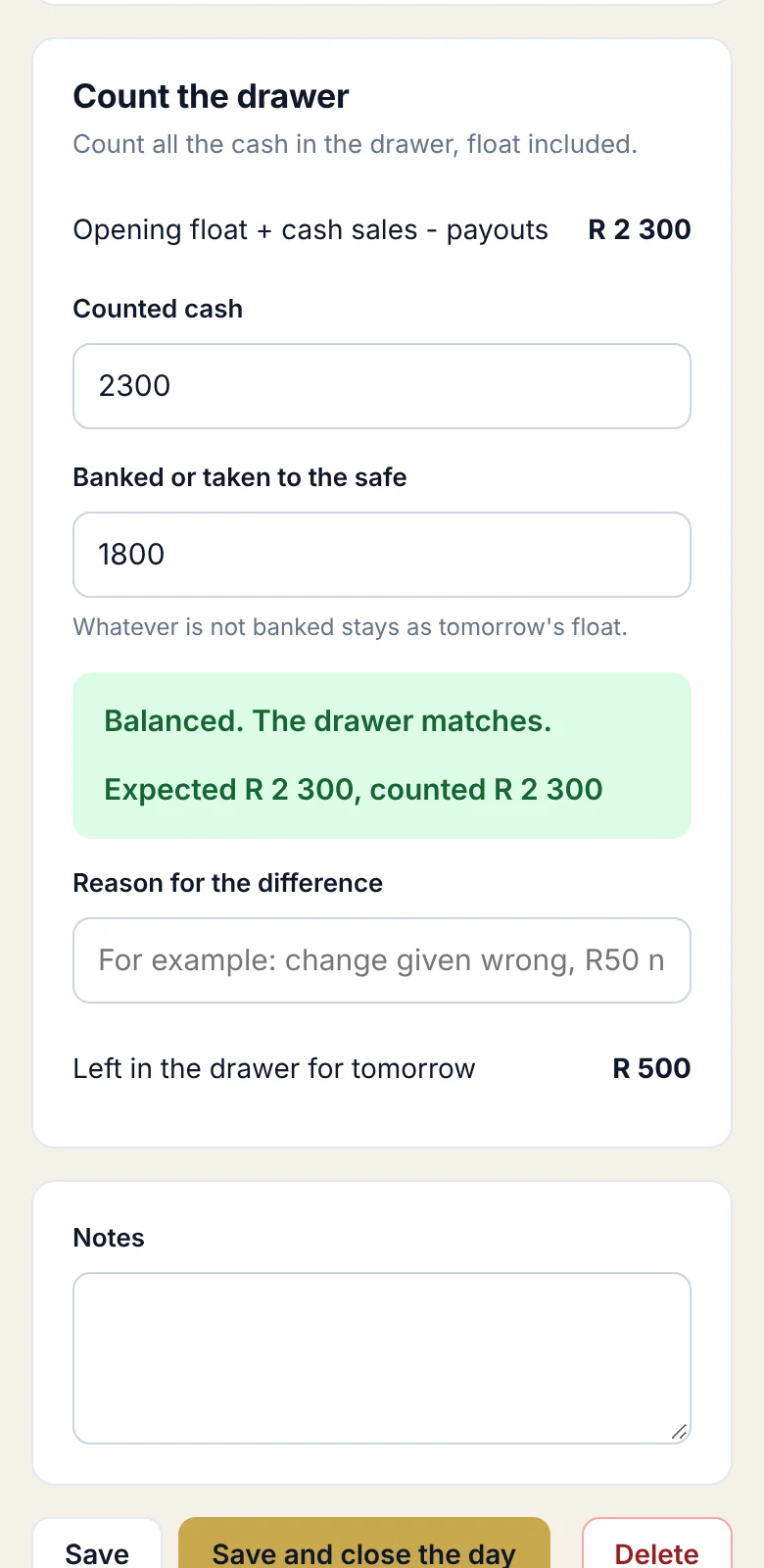
The dashboard at the end of the day, a cash-up being counted, the month at a glance and the report you print.
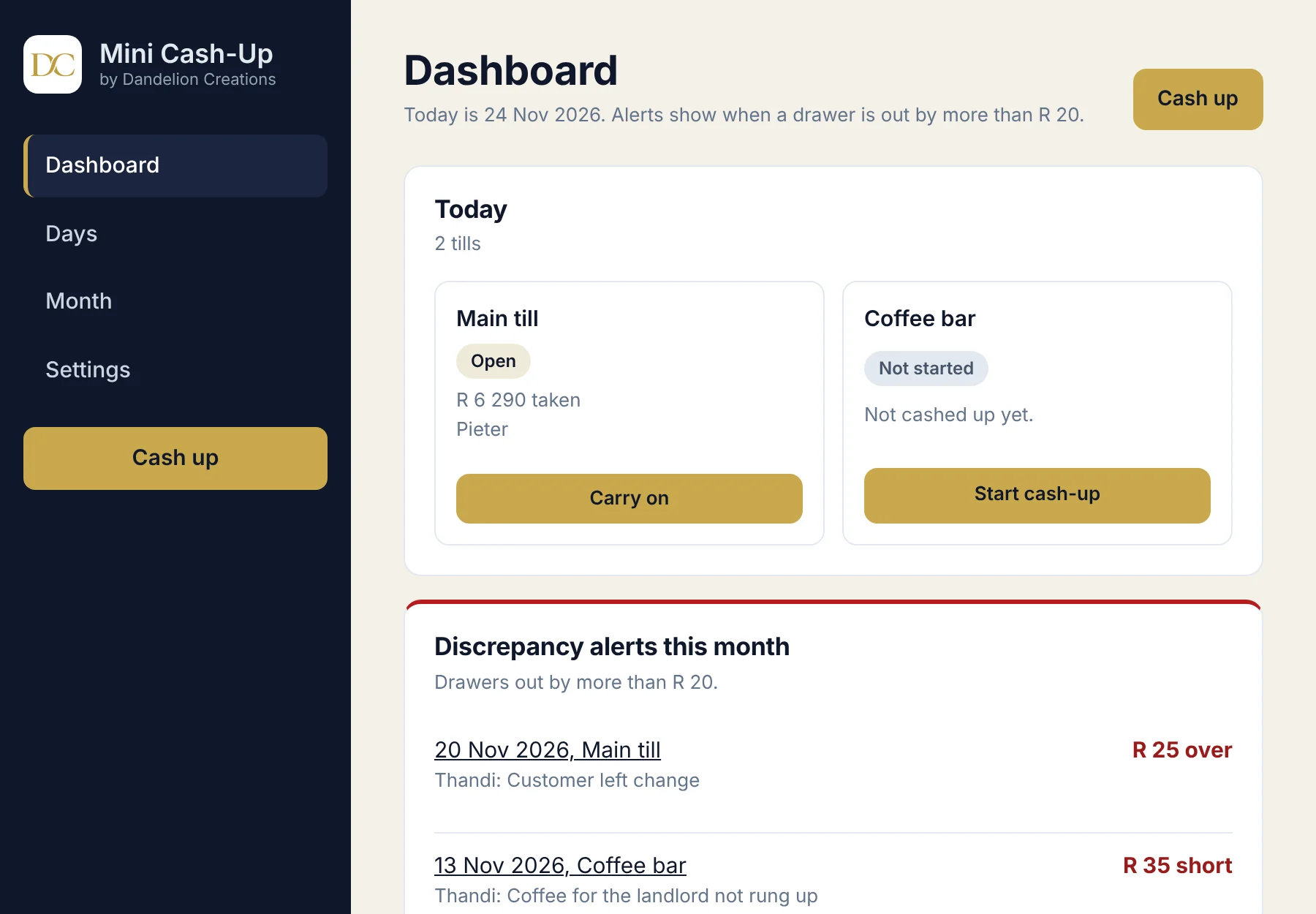
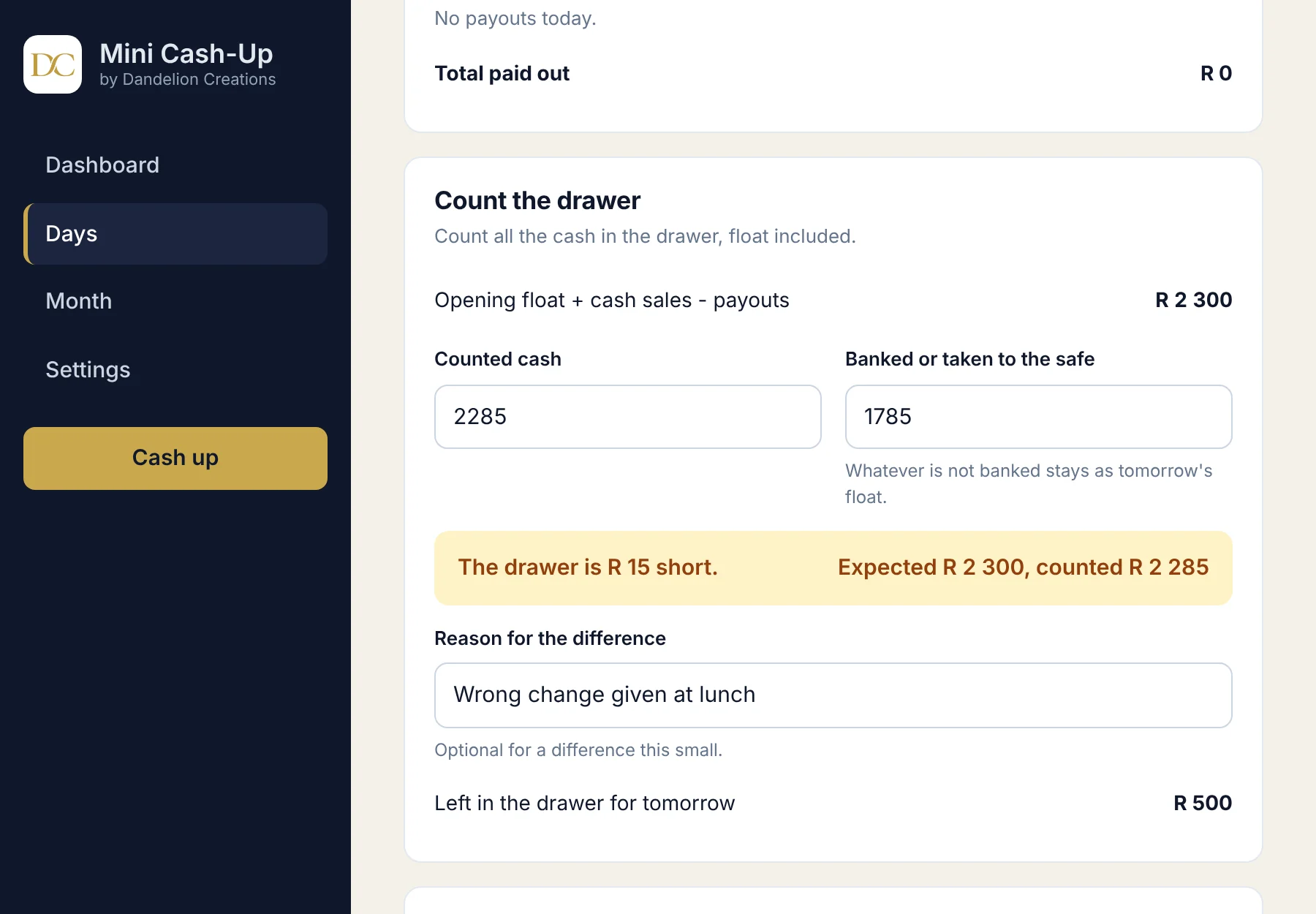
Counting the drawer
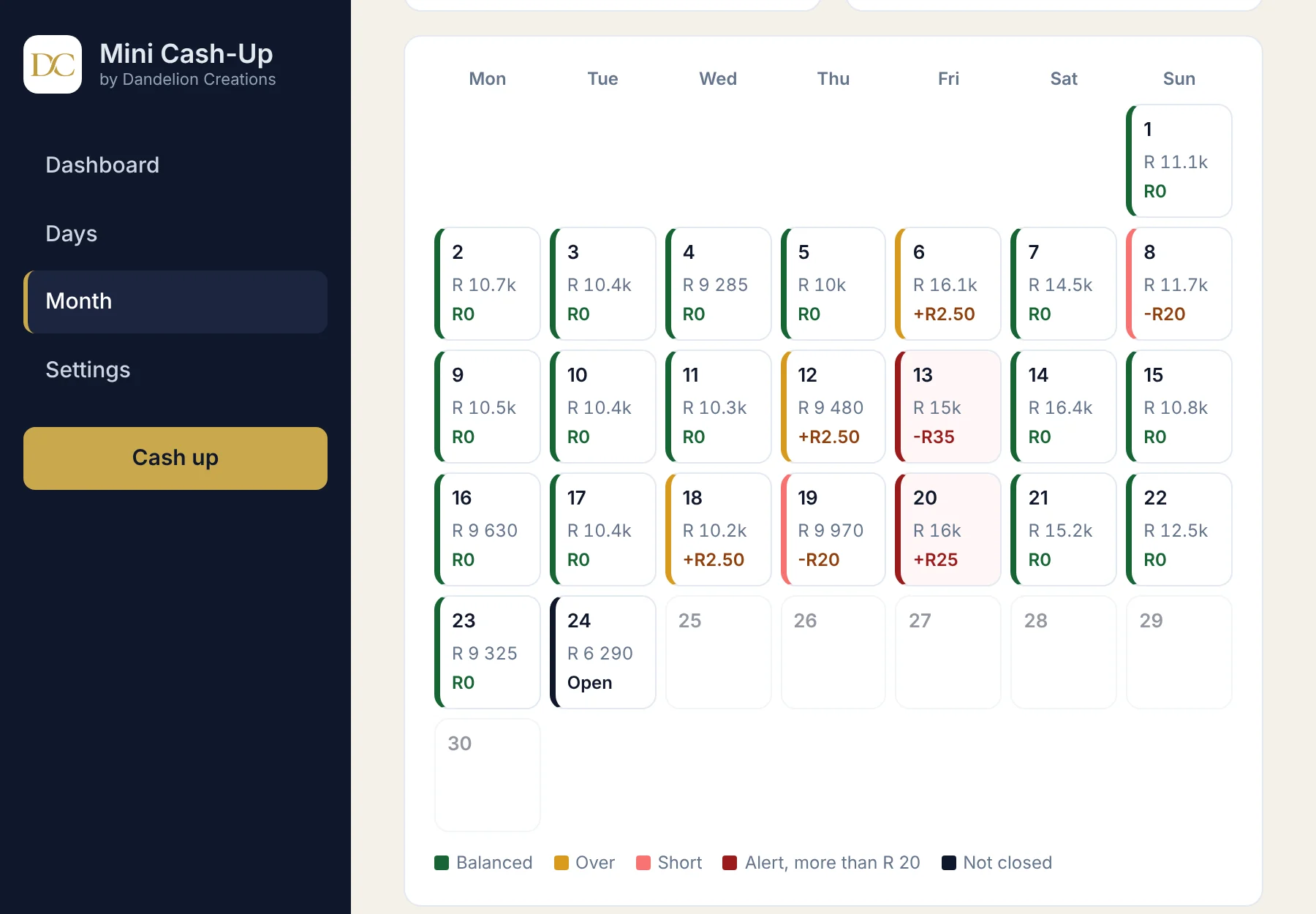
The month at a glance
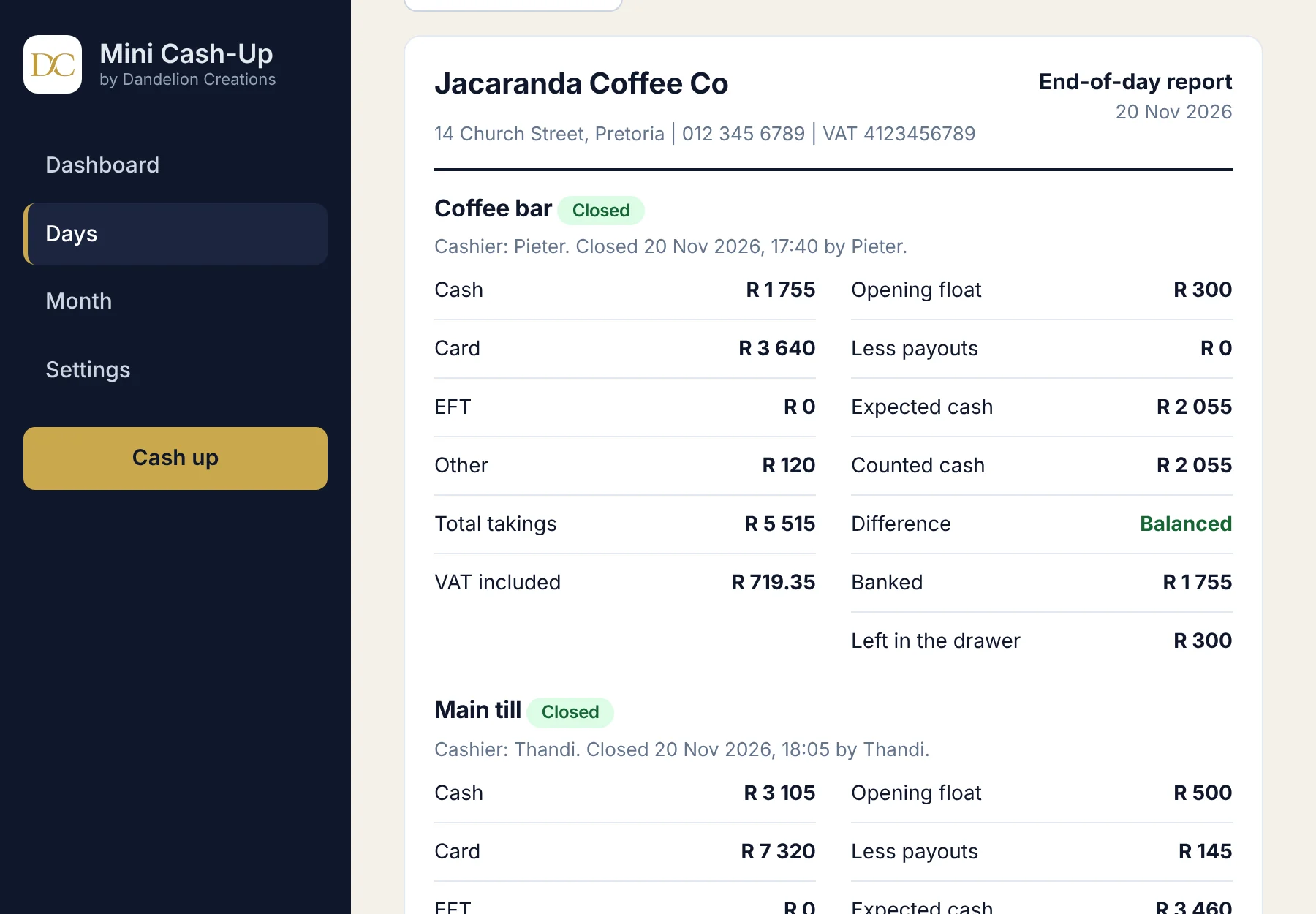
The end-of-day report
The same link on a phone
Screens show made-up demo data.
A cash-up book or Mini Cash-Up?
A book or a spreadsheet works until someone adds it up wrong. Mini Cash-Up is still your spreadsheet, with the sums and checks done for you.
| What you get | A cash-up book or sheet | Mini Cash-Up |
|---|---|---|
| Expected cash worked out for you | You do the sum | Yes, as you type |
| A reason for every big difference | Only if someone writes it | Always |
| Closed days that can't be changed quietly | No | Yes, with a log |
| Card slips checked against the till | Sometimes | Every day |
| Float carried to the next day | By memory | Yes |
| Month view and end-of-day report | No | Yes |
| Price | Your time | R499 once-off |
What it does not do
So you know before you buy.
No personal logins
Everyone with your private link sees and can change every cash-up. The cashier name records who closed the till. It is not a sign-in and can't prove who did what. If you need separate logins, this is not the right tool.
No bank or card machine connection
You type in the totals from the till slip and the card machine slips, and Mini Cash-Up checks one against the other. It doesn't connect to your bank, your card machine or your POS, and EFTs aren't matched to your bank statement.
No safe or cash drop tracking
Each day records what was banked or taken to the safe. It doesn't keep a running safe balance or track bank deposit slips.
No stock, no invoices, no SARS filing
It records the cash-up and nothing else. Alerts show in the app only, with no emails or messages. The VAT figure is a guide for your bookkeeper, not a return.
R499 once. Yours to keep.
No monthly fee, no price per till, no renewal.
Mini Cash-Up: Daily Cash Reconciliation
- The Mini Cash-Up sheet and your activation key
- 72 hour demo before you commit
- Short setup guide
- A free setup call, up to 20 minutes, on a screen share
- CSV export any time
Not happy? We help first with a setup call, then refund you if it still isn't right. Read the refund policy.
Questions
Short answers.
Can I try it first?
Yes. Make your own copy of the demo sheet, set it up with the guide, and start the 72 hour demo with the key CSH-DEMO-2026. Every feature is switched on, and a button loads a made-up coffee shop with two tills so you can look around. The demo can be started once per Google account. When it ends, your data stays in the sheet and the app asks for an activation key.
Is it a subscription?
No. You pay R499 once. There is no monthly fee and nothing to renew.
We have more than one till. Does that work?
Yes. Add each till in Settings with its usual float. Each till gets its own cash-up every day, and the end-of-day report puts them together.
What happens when a drawer is short?
You see it while you count. If it is out by more than the amount you set, say R20, the day can't close until someone gives a reason. It also shows on the dashboard as an alert.
Someone made a mistake on a closed day. Can it be fixed?
Yes. Open the day and reopen it with a reason. Fix it, then close it again. The log keeps the reason, who reopened it and when.
Where is my data stored?
In your own Google Sheet, in your own Google account. We never see your cash-ups. When you activate, your key and the email of your Google account are checked with us once, and after that Mini Cash-Up keeps working on its own.
Does it work on a phone?
Yes, in your phone's browser, from the same private link. It is not an app from an app store.
Do I need to know how to code?
No. Switching it on takes a handful of clicks and the guide shows each one. You can also book a free setup call and we do it together.
What if it isn't right for me?
We help first with a free setup call, then refund you if it still isn't right. The refund policy has the details.
Close the till with the answer, not a guess.
Switch Mini Cash-Up on once and keep every cash-up in a system you own.
Order Mini Cash-Up for R499