 Dandelion Creations
TrackAbility · Staff Time, Leave & Payslips
Hours, leave and payslips without the Friday scramble.
Staff clock in on a shop tablet or with a QR code and their own PIN. You see who is in, the overtime and the leave left, and print payslips at month end. It runs from your own Google Sheet. Pay once, no subscription.
R799 once-off. No subscription and no fee per staff member. Make your own copy of the demo sheet, then start the free 72 hour demo. A free setup call is included if you want a hand switching it on.
Best for shops, coffee shops, restaurants, salons and small teams paid by the hour. It does not work out PAYE or file anything with SARS.
A timesheet on paper is a guess with a signature on it.
Someone forgot to sign out, the overtime is a fight, and nobody knows how much leave is left. TrackAbility keeps the times as they happen, works out the hours, and shows you the leave and pay before payday.
Owned, not rented
No monthly fee and no price per employee. It runs in your own Google account and keeps working.
Your staff data stays yours
Hours, rates and payslips sit in your own spreadsheet. We never see them. The only thing we check is your activation key and the Google email that activates it, once.
Every fix has a reason
Changing a shift needs a reason, and the log keeps the times before and after. A final payslip locks the hours it was made from.
How it works
From ordering to your first clock-in in three steps.
Get your sheet and key
Order and pay, and we email you the sheet link and your activation key.
Switch it on once
A short guide takes you through setup from your own Google account. Or book a free setup call and we do it together on a screen share, up to 20 minutes.
Add your staff
Each person gets an hourly rate and a 4 digit PIN. Put the clock-in link on the shop tablet, print the QR code for the wall, and you are ready.
What is inside
Clocking in, the hours, the leave and the payslip, in one place.
- Clock in on a tablet or a phoneA tablet that stays at the shop, or a QR code staff scan with their phone. You choose, and you can switch phone clock-in off.
- A PIN for each personStaff tap their name and type their own 4 digit PIN. Five wrong tries lock that person for 15 minutes.
- Breaks and missed clock-outsStart and end a break with one tap. A shift left open too long is flagged so you can fix it.
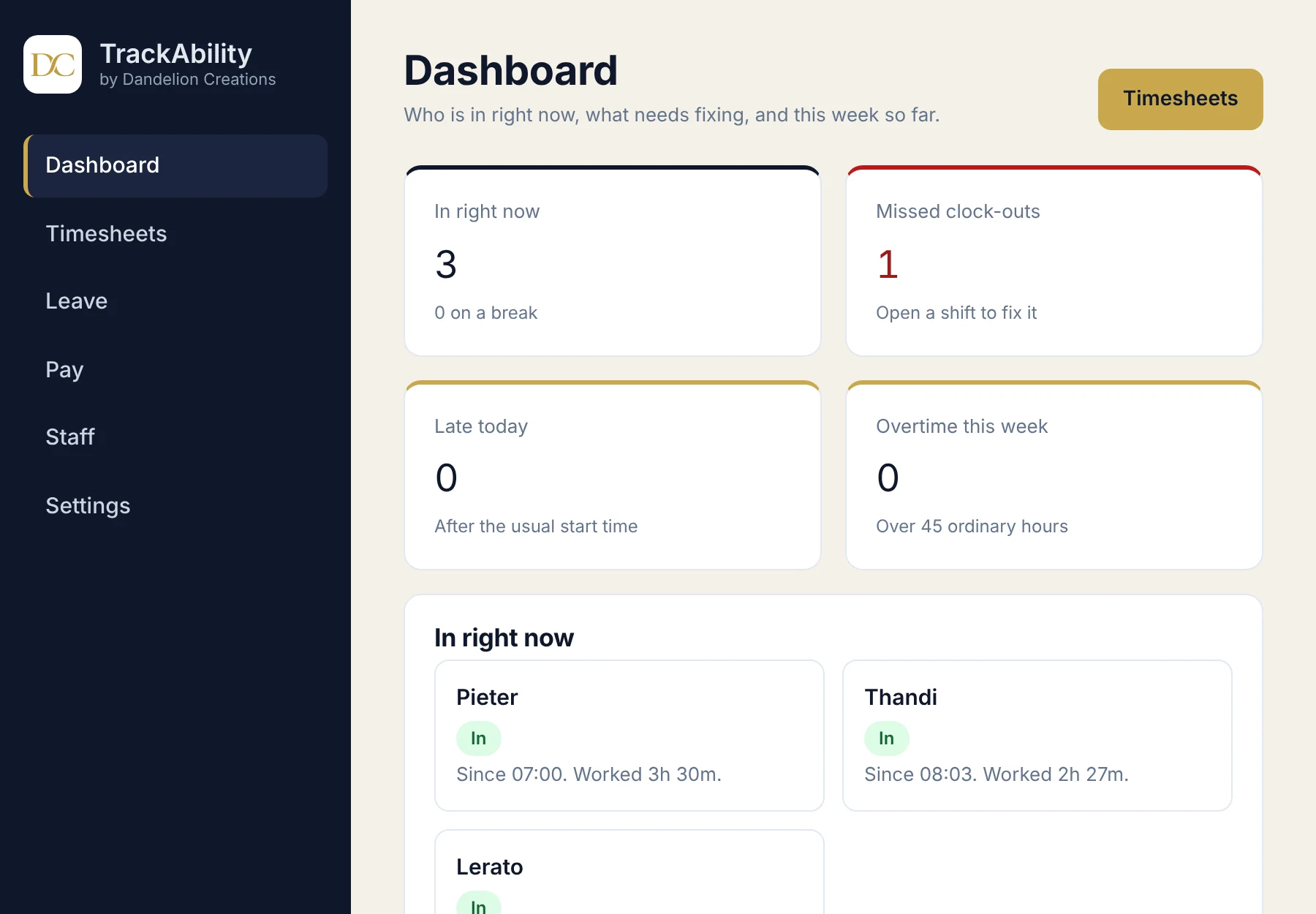
- Who is in right nowThe dashboard shows who is at work, who was late, and the overtime this week.
- Overtime, Sundays and public holidaysWorked out for you on the Basic Conditions of Employment Act defaults: over 45 hours a week at 1.5 times, Sundays at 1.5 times, public holidays at 2 times. You can change them.
- Public holidays loaded2026 and 2027 are in, with the days moved to Monday when a holiday falls on a Sunday.
- Leave balancesAnnual, sick and family responsibility leave, worked out the BCEA way, with what each person has left. Unpaid leave too.
- PayslipsOne click makes a draft for everyone. Add PAYE and anything else, make it final, and print it or save it as a PDF.
- UIF worked out1% from the staff member and 1% from you, up to the ceiling, shown on every payslip.
- Weekly, fortnightly or monthlyPick how often you pay, and the pay periods follow.
- A log of every changeFixed shifts, removed leave and reopened payslips all go in the Log sheet with a reason.
- CSV for your bookkeeperDownload the shifts, the leave and the payslips any time.
See it in action
The dashboard in the morning, the week's timesheet, the leave balances, a payslip and the clock-in screen on a phone.
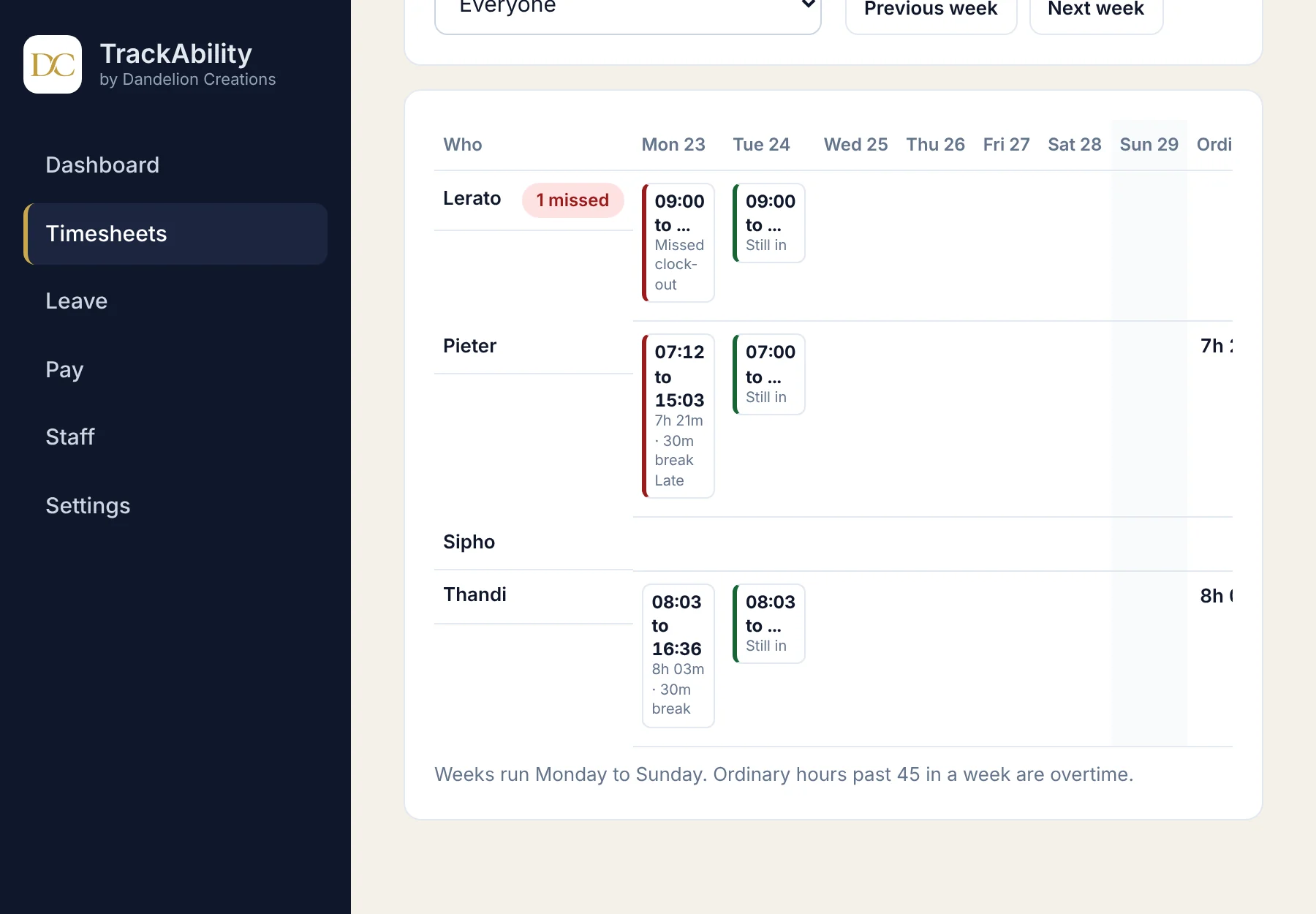
The week's timesheet
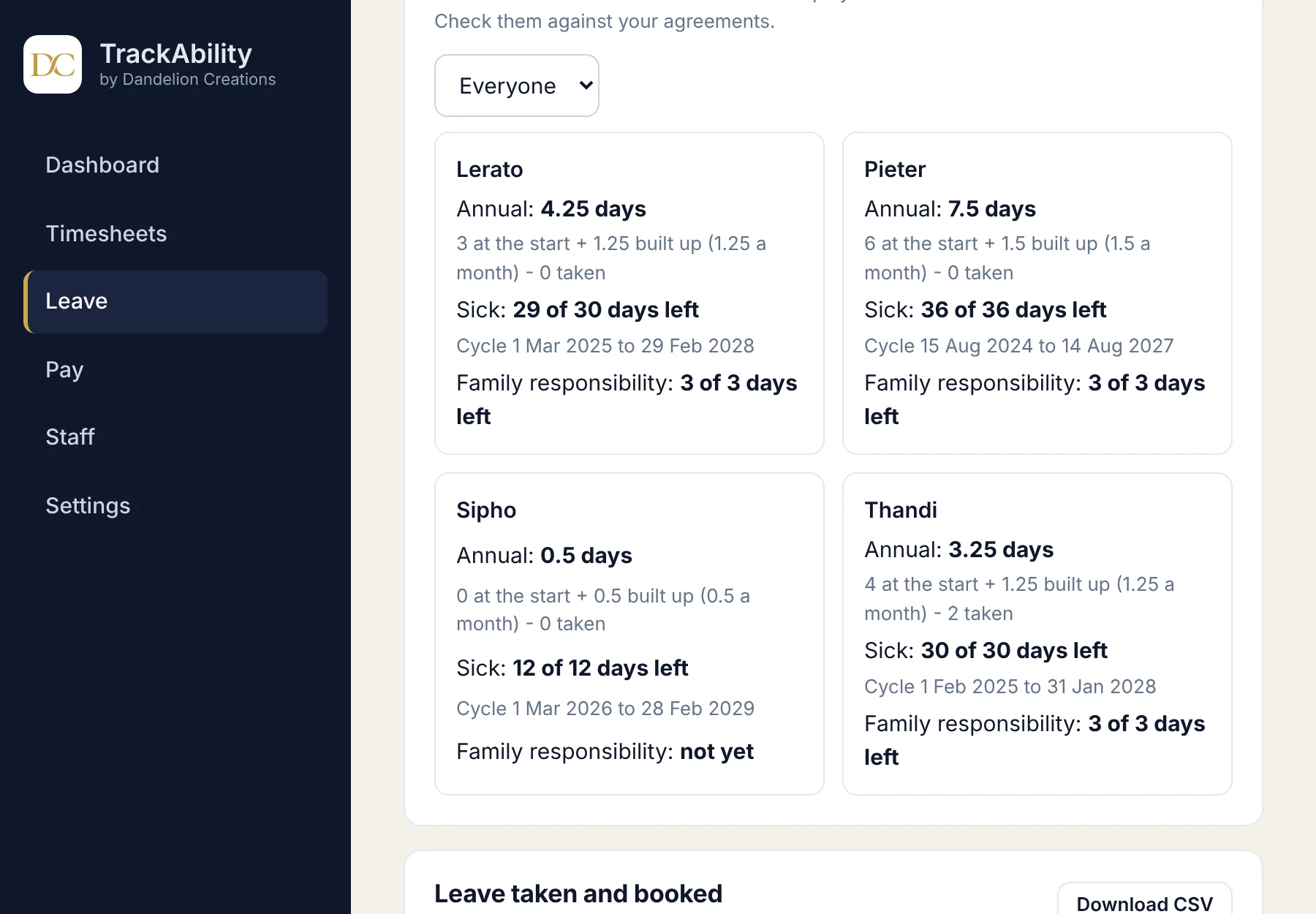
What each person has left
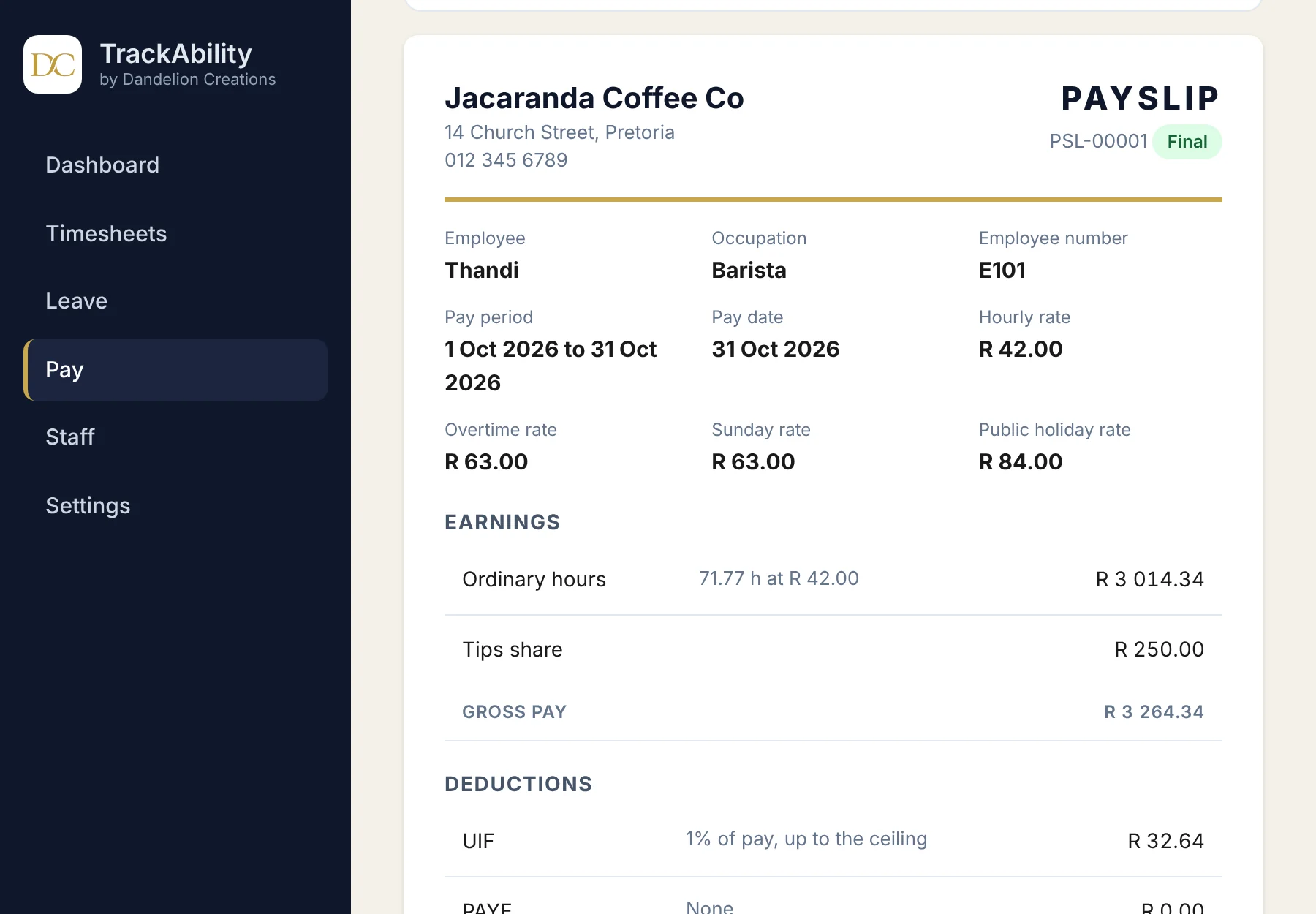
A payslip, ready to print
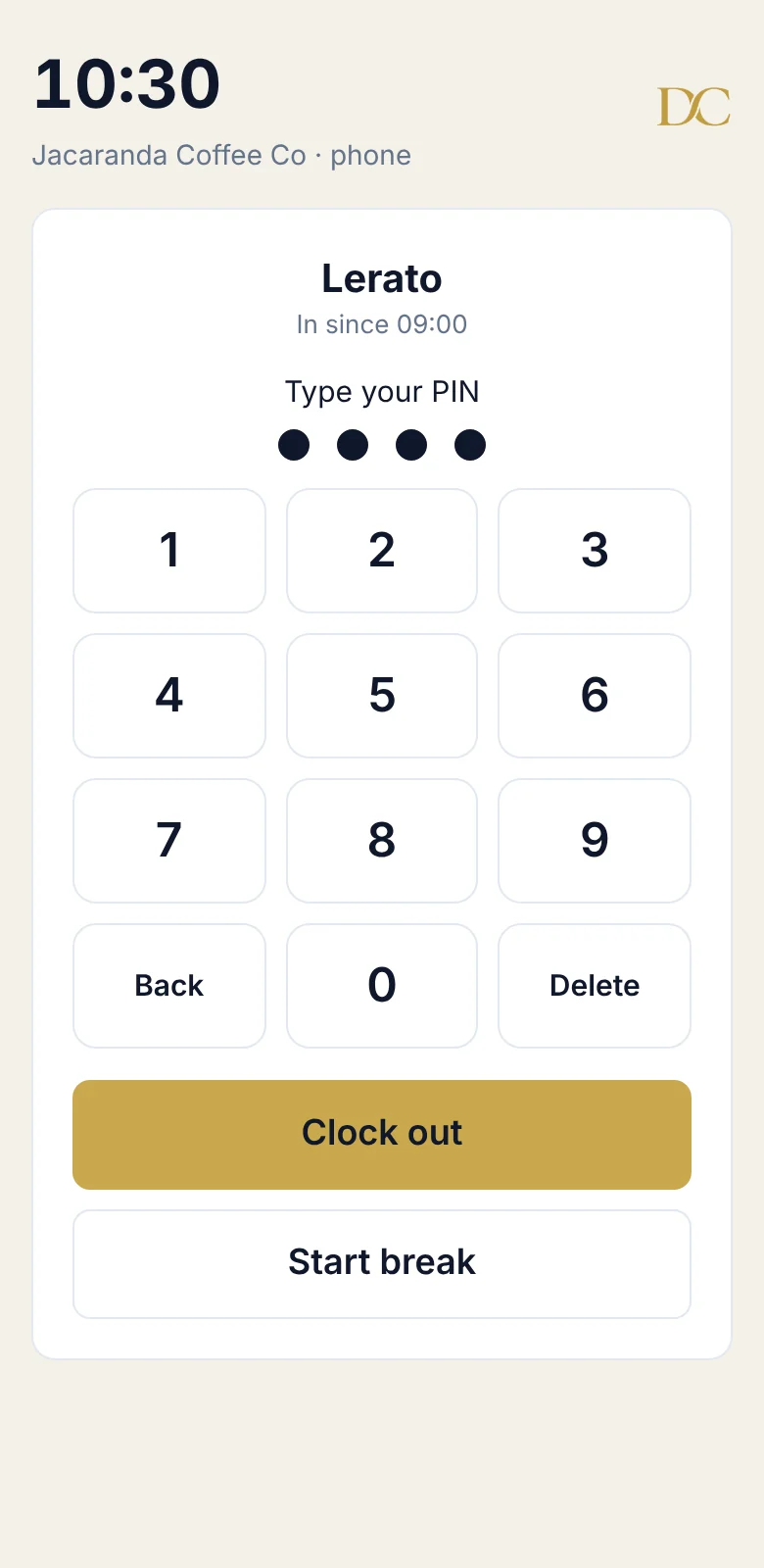
Clocking in with the QR code
Screens show made-up demo data.
A paper timesheet or TrackAbility?
Paper works until someone forgets to sign, or the hours don't add up on payday.
| What you get | Paper or a spreadsheet | TrackAbility |
|---|---|---|
| The real time someone arrived | What they wrote down | From the sheet's clock |
| Overtime and public holiday hours | You do the sum | Worked out for you |
| Leave left for each person | Somewhere in a file | Always up to date |
| Payslips with UIF | Typed by hand | Made from the hours |
| A reason for every change | No | Yes, with a log |
| Price | Your time | R799 once-off |
What it does not do
So you know before you buy.
No PAYE calculation
TrackAbility works out the hours, the gross pay and UIF. You or your bookkeeper type in the PAYE from the SARS tables. It doesn't file anything with SARS or the Department of Employment and Labour.
No payments
It makes the payslip. It doesn't pay anyone or connect to your bank. You pay your staff the way you do now.
No location check
The QR code works from anywhere if someone has a photo of it. If that matters, use the shop tablet and switch phone clock-in off. There is no GPS or fingerprint check.
Not for large payrolls
It is made for small teams paid by the hour. Salaried staff on fixed monthly pay, commission and sector bargaining council rules are not built in.
R799 once. Yours to keep.
No monthly fee, no price per employee, no renewal.
TrackAbility: Staff Time, Leave & Payslips
- The TrackAbility sheet and your activation key
- 72 hour demo before you commit
- Short setup guide
- A free setup call, up to 20 minutes, on a screen share
- CSV export any time
Not happy? We help first with a setup call, then refund you if it still isn't right. Read the refund policy.
Questions
Short answers.
Can I try it first?
Yes. Make your own copy of the demo sheet, set it up with the guide, and start the 72 hour demo. Every feature is switched on, and a button loads a made-up coffee shop with four staff, five weeks of shifts, leave and payslips. The demo can be started once per Google account. When it ends, your data stays in the sheet and the app asks for an activation key.
Is it a subscription?
No. You pay R799 once. There is no monthly fee, no fee per staff member and nothing to renew.
Can staff clock in from home?
Not with the shop tablet. With the QR code they could, if they have a photo of it, so you can switch phone clock-in off and use only the tablet. If a link or the printed code gets out, make new clock-in links and the old ones stop working.
Does it work out PAYE?
No. It works out the hours, the gross pay and UIF. You or your bookkeeper type in the PAYE on each payslip. We'd rather you get tax right from the SARS tables than trust a guess.
Is it BCEA compliant?
The overtime, Sunday, public holiday and leave rules start on the Basic Conditions of Employment Act defaults, and the payslip shows what section 33 asks for. Your agreements or sector rules may differ, so you can change the rules in Settings. Check them with your bookkeeper.
Someone forgot to clock out. Can it be fixed?
Yes. Open the shift on the timesheet, put in the right time and give a reason. The log keeps the times before and after.
Where is my data stored?
In your own Google Sheet, in your own Google account. We never see your staff, hours or pay. When you activate, your key and the email of your Google account are checked with us once, and after that TrackAbility keeps working on its own.
Do I need to know how to code?
No. Switching it on takes a handful of clicks and the guide shows each one. You can also book a free setup call and we do it together.
What if it isn't right for me?
We help first with a free setup call, then refund you if it still isn't right. The refund policy has the details.
Pay the hours that were worked.
Switch TrackAbility on once and keep every shift, every leave day and every payslip in a system you own.
Order TrackAbility for R799